

Beware of scams
Alert: Avoid Jim’s Group Fake Offers, Scam Websites, Social Media Impostors and protect your personal information
At Jim’s Group, we take pride in our diverse range of services – from mowing your lawn to cleaning your home, we’re here for you. However, we also want to ensure that your experience with us is not just excellent but also secure.
VERIFY OUR WEBSITES
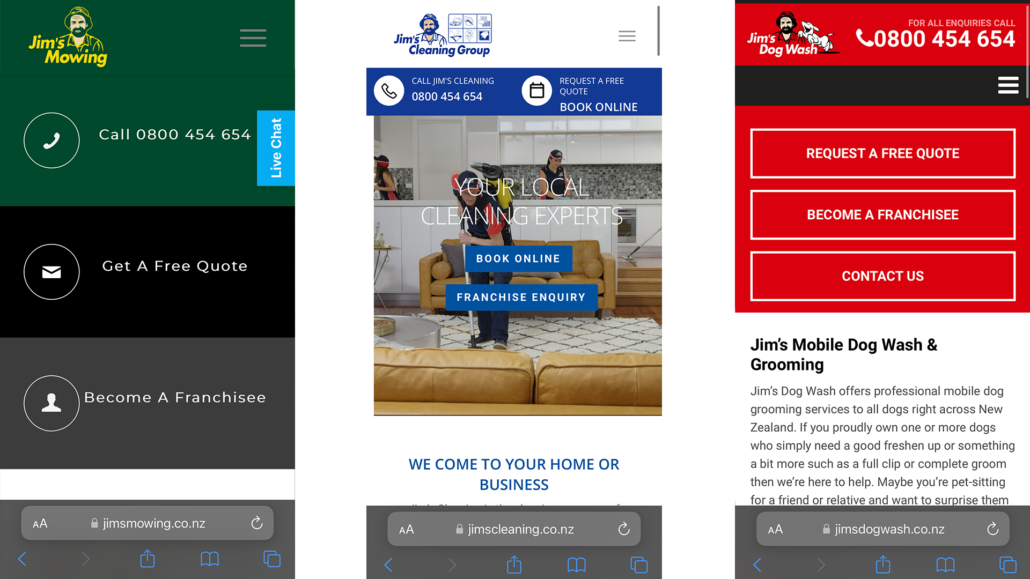
Jim’s Group operates multiple divisions, each with its own domain. Whether you’re booking a mowing service or any other of the 50+ divisions, always ensure that the website address is a legit Jim’s Franchise website. Our official website in New Zealand is jims.co.nz. You can trust links to divisions and services on that page. Some divisions may not appear on jims.co.nz though. If you are unsure, don’t hesitate to call 0800 454 654 to be certain you are booking with a real Jim’s division, or contact infotech@jims.net to report a website if you think it is a scam.
INTERACT WITH OFFICIAL SOCIAL MEDIA ACCOUNTS
Please avoid sharing any personal details with unverified accounts claiming to represent Jim’s Group. If you’re uncertain, contact Jim’s Group Head Office directly at the official number provided on our website.
Below find some of our official social media accounts:


REPORT SUSPICIOUS ACTIVITY
Report Suspicious Activity
If you encounter a questionable website or suspect a scam involving Jim’s Group, notify us immediately at infotech@jims.net You can also report the issue to https://www.consumerprotection.govt.nz/general-help/scamwatch/
It’s crucial that you get in touch with us immediately in the following scenarios:
- You have transferred money or authorized a payment due to a scam
- You have provided your identity or banking details to someone you suspect is a scammer
- You have discovered transactions that you did not authorize.

Learn How To Protect Yourself From Scams
At Jim’s, we take your security and privacy seriously. We understand that scams can be a serious concern for our clients, which is why we have compiled a list of frequently asked questions and their answers to help you stay protected from scams. Check out our list of common questions below:
To safeguard yourself from scams, never disclose your personal or financial information to anyone you don’t know. Be wary of unsolicited phone calls, emails, and messages that ask you to provide sensitive data or wire funds.
Also, keep your antivirus and computer software up-to-date, and regularly monitor your bank accounts for unusual activity.
If you receive an email that appears to be from Jims and looks suspicious, do not click on any links or download any attachments. Take a screenshot and send it to infotech@jims.net (Do Not forward the email), and we’ll investigate it.
If you receive an unsolicited phone call from someone who claims to be from Jims and asks you to provide your personal or financial information, do not disclose any information. Hang up immediately and report the incident to infotech@jims.net
Be cautious of unsolicited messages claiming you won a prize. It is likely a scam to obtain your personal information or money. Do not click on any links or provide any personal information. Delete the message or take a screenshot and send it to infotech@jims.net (Do Not forward the email), and we’ll investigate it.
Monitor your credit card transactions for any suspicious activity. Contact your bank or credit card company to report the incident and request a new credit card. Be cautious of websites that ask for your personal or financial information and always verify the website’s legitimacy.
Do not provide any personal or login information. It is likely a phishing attempt to steal your information. Contact Jims.co.nz directly to verify if there are any issues with your account.
Verify the source of the invoice or bill by contacting us directly at infotech@jims.net. Do not click on any links or download any attachments in the message.
If you suspect that you have been scammed, act quickly to minimize the damage. Contact your bank or credit card company to freeze your accounts and dispute any unauthorized transactions. Also, report the incident to the relevant authorities.
Additional Useful Sources
The ACSC (Australian Cyber Security Centre) which is a unified center for cybersecurity in Australia, integrates cybersecurity capabilities from various government agencies into one location. It serves as a central point for cooperation and sharing of information between public and private sectors to fight against cyber threats. The ACSC also offers up-to-date and practical information on how individuals and small businesses can safeguard themselves from cyber threats, including online scams, software weaknesses, hazardous online conduct, and malicious activities.
ReportCyber is a confidential platform that allows individuals to report cybercrime and online incidents that may violate Australian laws. It serves as a secure reporting and referral service for such incidents. The website of ReportCyber not only provides a reporting mechanism but also offers valuable information regarding cybercrime.
The Australian Competition and Consumer Commission (ACCC) operates ScamWatch, which offers guidance to individuals and small enterprises on identifying, preventing, and reporting fraudulent activities.
IDCARE is a non-profit organization that offers assistance to individuals who have experienced identity theft. Their services are personalized to each individual and include guidance on how to protect your identity from further theft or misuse. You can contact IDCARE at 1800 595 160 and their services are provided at no cost.